Hey folks I Already posted you a trick to make a icon for shutdown /restart/logoff .
Now i'll present you a tip to make the shutdown faster than ever before.
Follow this steps to make faster
Steps
*goto strat
*click run and type Regedit(Registry editor) click enter
* then select HKEY CURRENT USERoption in the left side column
*after that select control panel -->desktop
*then find the item "AutoEndTasks" in right side column
right click that modify "AutoEndTasks"="1"
*then click and modify "HungAppTimeout"="1000"
*Modify "WaitToKillAppTimeout"="2000"
*after that goto HKEY_LOCAL_MACHINE-->SYSTEM-->CurrentControlSet-->Control
modify
"WaitToKillServiceTimeout"="2000"
*close the regedit and restart
or you can follow this simple method
*Open Notepad, copy and paste the following to the Notepad
Windows Registry Editor Version 5.00
[HKEY_CURRENT_USER\Control Panel\Desktop]
"AutoEndTasks"="1"
"HungAppTimeout"="1000"
"WaitToKillAppTimeout"="2000"
[HKEY_LOCAL_MACHINE\SYSTEM\CurrentControlSet\Control]
"WaitToKillServiceTimeout"="2000"
*Save the file with extension .reg (registry file)
*Double click open this file and click Yes and the OK
*restart
Download Windows Registry editor 5.0
By following anyone of the above tips windows shuts down faster than never before
hope you like this tweak.
Sunday, August 1, 2010

Pirates Of Caribbean On Stranger Tides
.jpg)
Here is the Teaser Trailer of the much awaited movie of Pirrates of Caribbean Franchise.Strange tides is the Fourth installment of Pirrates series that every one is every is waiting movie.
This cult,Adventours,cunning franchise grabbed millions of hearts right from the starting movie Black Pearl.
how can one forget cunning ,misguiding,interesting ,funny Captian Jack sparrow!!!
Produced by Mega Producer Jerry Bruckhelimer and Directed by Rob Marshall.It is Scheduled to comeout in May 2011.
Unlike the Previous parts it is set in Hawaii.
It draws inspiration from the novel of the same name On Stranger Tides by Tim Powers
Coming to plot:
Captain Jack Sparrow crosses paths with a woman from his past (Penelope Cruz), and he's not sure if it's love--or if she's a ruthless con artist who's using him to find the fabled Fountain of Youth. When she forces him aboard the Queen Anne's Revenge, the ship of the formidable pirate Blackbeard (Ian McShane), Jack finds himself on an unexpected adventure in which he doesn't know who to fear more: Blackbeard or the woman from his past.
As Per disney Press release
Johnny deep returns as fun loving guy captian Jack Sparrow ,Geoffery rush comes as Barbossa.Ian mcshane will play the villian as Black beard ,Penelope cruz as the daughter of Black beard and jack's love interest.
The story is just the continuation of third movie At world's End .
Orlando Broom(william turner) and kiera knightley (Elizabeth swann) stayed away from project as their were busy in other films ,so their characters would be ended.
 |
| Curse of Black Pearl |
The first movie was my one of favourite of all time adventerous flicks,the second Dead manschest was a bit long and edited badly but had truely awakening ,mind blowing visuals ,third asthe same just as eye candy.Hope the fourth continues legacy and excells black pearl.
But they are definetly entertaining eye pop,adventurous movies of all time.everyone likes the way jack sparrow moves and makes fun.
Microsoft Office 2011 for Mac

Microsoft office for mac is currently in beta stages .
It was based on mac ribbon interface.
Watch the video of this new product on you tube
Try microsoft office mac 2008
How to Restart Windows without Restarting your PC
Restart your computer without rebooting.
There are two types of reboots hot reboot and cold reboot.
The main difference between the two types of start up is that, on a hot boot, the CPU remains powered up. On a cold start the CPU powers down then restarts.
This helps you when u installed a program which requests the restart while you are working on some important work.
when you click on the shutdown button, make sure to simultaneous press shift Button.
If you hold the Shift key down while clicking on Shutdown button, you computer will restart without restarting the Computer. This is callled a hot reboot.
There are two types of reboots hot reboot and cold reboot.
The main difference between the two types of start up is that, on a hot boot, the CPU remains powered up. On a cold start the CPU powers down then restarts.
This helps you when u installed a program which requests the restart while you are working on some important work.
when you click on the shutdown button, make sure to simultaneous press shift Button.
If you hold the Shift key down while clicking on Shutdown button, you computer will restart without restarting the Computer. This is callled a hot reboot.
Rename your Recyclebin
Change the name of your Recycle Bin,the place where temporarely deleted files are stored.
Just follow the following simple steps and have fun.
*Goto 'start' menu ,Choose 'Run' command.
*Type 'regedit' (without quotes).
* then you may notice Registery editor window.
*Select "HKEY_CLASSES_ROOT" and then CLSD
*Then select "{645FF040-5081-101B-9F08-00AA002F954E}"(you may notice lot of folders,dont worry)
*Open the shellFolder folder
*Change the "Attributes" data value from "40 01 00 20" to "50 01 00 20".
*change the "CallForAttributes" dword value to "0x00000000"
Change the value from 40 to 0.
*You must change both of these values to get the rename to appear.
*After performing the above steps you will be able to rename the icon like any other icon. Right-click the Recycle Bin icon on the desktop and click rename and rename it to any of your choice.
*NOTE: this above works only for windows xp
****************************************************************************************
The below procedure is for all windows apart from xp
*Double click on Default icon from the right side of your window
*you will see the current name of your "recycle bin".
Simple change it to whatever you want ex: Trash or your name
*close the Registry Editor.
*CLick O.K. button.
*Goto Your Desktop and Refresh the Desktop and See the magic.
Your Recycle Bin has been Renamed.
*hope you like this trick
NOTE: this works only for windows xp
Just follow the following simple steps and have fun.
*Goto 'start' menu ,Choose 'Run' command.
*Type 'regedit' (without quotes).
* then you may notice Registery editor window.
*Select "HKEY_CLASSES_ROOT" and then CLSD
*Then select "{645FF040-5081-101B-9F08-00AA002F954E}"(you may notice lot of folders,dont worry)
*Change the "Attributes" data value from "40 01 00 20" to "50 01 00 20".
*change the "CallForAttributes" dword value to "0x00000000"
Change the value from 40 to 0.
*You must change both of these values to get the rename to appear.
*After performing the above steps you will be able to rename the icon like any other icon. Right-click the Recycle Bin icon on the desktop and click rename and rename it to any of your choice.
*NOTE: this above works only for windows xp
****************************************************************************************
The below procedure is for all windows apart from xp
*Goto 'start' menu ,Choose 'Run' command.
*Type 'regedit' (without quotes).
* then you may notice Registery editor window.
*Select "HKEY_CLASSES_ROOT" and then CLSD
*Then select "{645FF040-5081-101B-9F08-00AA002F954E}"
*Double click on Default icon from the right side of your window
*you will see the current name of your "recycle bin".
Simple change it to whatever you want ex: Trash or your name
*close the Registry Editor.
*CLick O.K. button.
*Goto Your Desktop and Refresh the Desktop and See the magic.
Your Recycle Bin has been Renamed.
*hope you like this trick
NOTE: this works only for windows xp
crazy game for your iPhone: Crazy Chicken Deluxe free for you


One of the most famous game characters his game is so crazy it's not easy but you must try to find the secret of the game to win,Definetly you should try this one of the best in iphone games.
Saturday, July 31, 2010
How to Defragment Your Hard Disk Drive
 Image via Wikipedia
This tool optimises the fragmented parts on hard disk .
Before getting into how to Defragment lets just now about Fragmentation
What is fragmentation?
Fragmentaton is a phenomenon in which storage space is used inefficiently, reducing storage capacity and in most cases performance.
Fragmentation occurs naturally when you use the hard disk drive usually through doing basic tasks like deleting, modifying, and creating files abruptly.
Defragmentation is a process that reduces the amount of Fragmentation in hard disk and eventually saving the space in hard disk.
How to Defragment
Before starting disk fragmenter close all programs ,Remove temporary internet files for better results
Steps:
*Click Start
*Select All Programs
*Click on Accessories
*Click on System Tools
* Run Disk Defragmenter
*select the drive which you want to defragment and start analyse
*Then start Defragmentation

Defragmenting may take a while juts be patient till it comes
After the completion of process you will notice that some memory is been saved.

Increase Hard Disk R/w speed in Windows
Increase or optimize your Hard Disk read/write speed without any Extra software or changing HardDisk , increasing RAM just following steps .After doing so you can witness the improvement in speed as never before.
Steps to increase Harddisk R/W speed
*go to start and select Run command
*run SYSEDIT.EXE program from run
 * you may notice a bunch of windows ,in that select SYSTEM.INI and expand it
*scroll down to find the line "386enh" in the file.
*Press Enter to make one get next line, and in that line type
Irq14=4096 Press Enter to make one blank line, and in that line type
* Click on the File menu, then choose option Save.
* reboot your computer.
After Restarting windows you may notice improve in hard disk R/W speed as never before..
**note: Irq14 is case sensitive ...
:this trick works better with IDE drives.
Steps to increase Harddisk R/W speed
*go to start and select Run command
*run SYSEDIT.EXE program from run

*scroll down to find the line "386enh" in the file.
*Press Enter to make one get next line, and in that line type
Irq14=4096 Press Enter to make one blank line, and in that line type
* Click on the File menu, then choose option Save.
* reboot your computer.
After Restarting windows you may notice improve in hard disk R/W speed as never before..
**note: Irq14 is case sensitive ...
:this trick works better with IDE drives.
Friday, July 30, 2010
Create a Shutdown/Reboot/LogOff Icon
Create your own icon for shutting ,restarting windows.

Windows xp has a program called shutdown.exe which allows to create a icon for shutdown.
To create an icon just follow the following steps:
1)Right click on an open area of the desktop
2)Select New -> Shortcut
For shutdown:
* Enter in shutdown -s -t 00
For Restart
*Enter shutdown -r -t 00
For Logging off
*Enter shutdown -l -t 00
Here 00 indicates the time in sec. e.g. 10- will shutdown PC after 10 sec
3)Press the Next button
4) name the shortcut as u wish .
5) Click on the Finish button.

Windows xp has a program called shutdown.exe which allows to create a icon for shutdown.
To create an icon just follow the following steps:
1)Right click on an open area of the desktop
2)Select New -> Shortcut
For shutdown:
* Enter in shutdown -s -t 00
For Restart
*Enter shutdown -r -t 00
For Logging off
*Enter shutdown -l -t 00
Here 00 indicates the time in sec. e.g. 10- will shutdown PC after 10 sec
3)Press the Next button
4) name the shortcut as u wish .
5) Click on the Finish button.
Here -s shutdowns the computer
-r restarts
-l log offs
-a it aborts the shutdown
-f forces to close all applications
-t xx sets the timer to shutdown in certain no of seconds...xx =seconds ,say 20

-r restarts
-l log offs
-a it aborts the shutdown
-f forces to close all applications
-t xx sets the timer to shutdown in certain no of seconds...xx =seconds ,say 20
Thursday, July 29, 2010
Firefox Keyboard Shortcuts
Here are the some of the Firefox keyboard shortcuts that will help you in web browsing .
These shorcuts are simple but they are incredibley easier.
*open new tabs with CTRl + T
*Switch tabs using CTRL + n
Here n is not a letter .In this it represents the number key from 1 to 9 .Hold control and 'n' to switch between tabs.
*go to the address bar with CTRL + L
*Use CTRL + K to get the Search bar
*Use CTRL + Tab to switch,toggle between the tabs.
*Use backspace to get back to previous page
* to search certain word in web page use CTRL + F
*To close current Tab CTRL + W or CTRL + F4
* To close windows alt + F4
*to open new windows CTRL + N
* To get to address bar in new tab ALT + ENTER
*to open bookmarks CTRL + b
* to add bookmark CTRL + d
*to get to downloads ctrl + j
*To toggle private browsing ctrl + shift + p
* to clear browsing history ctrl + shift + del
These shorcuts are simple but they are incredibley easier.
*open new tabs with CTRl + T
*Switch tabs using CTRL + n
Here n is not a letter .In this it represents the number key from 1 to 9 .Hold control and 'n' to switch between tabs.
*go to the address bar with CTRL + L
*Use CTRL + K to get the Search bar
*Use CTRL + Tab to switch,toggle between the tabs.

*Use backspace to get back to previous page

* to search certain word in web page use CTRL + F
*To close current Tab CTRL + W or CTRL + F4
* To close windows alt + F4
*to open new windows CTRL + N
* To get to address bar in new tab ALT + ENTER
*to open bookmarks CTRL + b
* to add bookmark CTRL + d
*to get to downloads ctrl + j
*To toggle private browsing ctrl + shift + p
* to clear browsing history ctrl + shift + del
Windows 7 shortcuts
I already presented you some of windows xp shorcuts under keyboard shorcuts.
Here are the some of Keyboard shortcuts for Windows 7
Win + Tab : to cycle between Windows
Win + E : Windows Explorer is launched.
Win + R : Run Command is launched.
Win + F : Search (which is there in previous Windows versions too)
Win+ X : Mobility Center
Win+ L : Lock Computer
Win + U : Launches Ease of Access
Win + P : Projector
Win + T : Cycle Super Taskbar Items
Win + S : OneNote Screen Clipping Tool [you need to install one note first to get this (ms office)]
Win + M : Minimize All Windows
Win + D : Show/Hide Desktop
Win + Up : Maximize Current Window
Win + Down : Restore Down / Minimize Current Windows
Win+ Left : Tile Current Window to the Left
Win + Right : Tile Current Windows to the Right
Win+ any number : Quickly Launch a new instance of the application in the Nth slot on the taskbar.
Example Win+1 launches first pinned app,Win+2 launches second, etc.
Win+ = : Launches the Magnifier
Win + Plus : to Zoom in
Win + Minus : Zooms out
Win + Space : to Peek at the desktop
Here are the some of Keyboard shortcuts for Windows 7
Win + Tab : to cycle between Windows
Win + E : Windows Explorer is launched.
Win + R : Run Command is launched.
Win + F : Search (which is there in previous Windows versions too)
Win+ X : Mobility Center
Win+ L : Lock Computer
Win + U : Launches Ease of Access
Win + P : Projector
Win + T : Cycle Super Taskbar Items
Win + S : OneNote Screen Clipping Tool [you need to install one note first to get this (ms office)]
Win + M : Minimize All Windows
Win + D : Show/Hide Desktop
Win + Up : Maximize Current Window
Win + Down : Restore Down / Minimize Current Windows
Win+ Left : Tile Current Window to the Left
Win + Right : Tile Current Windows to the Right
Win+ any number : Quickly Launch a new instance of the application in the Nth slot on the taskbar.
Example Win+1 launches first pinned app,Win+2 launches second, etc.
Win+ = : Launches the Magnifier
Win + Plus : to Zoom in
Win + Minus : Zooms out
Win + Space : to Peek at the desktop
Iphone video Conertors
 Image by Getty Images via @daylife
These convertors easily convert videos, movies, and TV shows for your iPhone 3G, iPhone 3GS, or iPhone 4
* Suport almost all video formats like WMV, AVI, MKV, FLV, etc.
* Capture video clips or merge several videos into one continuous video
Download here:
Iskysoft Iphone video convertor
http://www.iphonevideoconverter.com/software.html
Free video convertor
Xilisoft iPhone Video Converter

Windows IP Configuration Tool (ipconfig)
Ip config is a command to configure Ip connections.ipconfig is a commmand line utility available on all versions of Microsoft Windows xp,vista,windows 7,win 98.
Ip config is designed to run from command prompt.it gives the information about ip address of computer.
it is also used to control other active connections and configure them.Ip config is the newer version of winipcfg which works only on windows 98.
to use this command go to start-->run--> type cmd and click enter
and next type the command "ipconfig/all"(without quotes) then by hitting up enter youm get info of the ip .

There are many switches for ipconfig you can get them by typing ipconfig/?
 you can reconfigure ip by using the above options.
Ip config is designed to run from command prompt.it gives the information about ip address of computer.
it is also used to control other active connections and configure them.Ip config is the newer version of winipcfg which works only on windows 98.
to use this command go to start-->run--> type cmd and click enter
and next type the command "ipconfig/all"(without quotes) then by hitting up enter youm get info of the ip .

There are many switches for ipconfig you can get them by typing ipconfig/?

Shorcut to open Various Windows utilities through Run
Run shortcuts for all windows operating systems windows xp/vista /windows 7
We can open any windows utility or a program through run
Here are the some of the commands for opening windows applications .
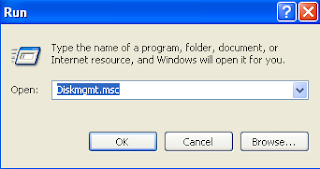
Go to start and click run and type below commands
Calc - Calculator
certmgr.msc - Certificate Manager
Cfgwiz32 - ISDN Configuration Wizard
Charmap - Character Map
Chkdisk - Repair damaged files
ciadv.msc - Indexing Service
Cleanmgr - Cleans up hard drives
Clipbrd - Windows Clipboard viewer
Cmd - Opens a new Command Window
compmgmt.msc - Computer management
Control - Displays Control Panel
Dcomcnfg - DCOM user security
Debug - Assembly language programming tool
Defrag - Defragmentation tool
devmgmt.msc - Device Manager
dfrg.msc - Defragment
diskmgmt.msc - Disk Management
Drwatson - Records programs crash & snapshots
Dxdiag - DirectX Diagnostic Utility
Explorer - Windows Explorer
Eventvwr.msc - Event Viewer
Fontview - Graphical font viewer
Ftp - ftp.exe program
Fsmgmt.msc - Folder Sharing Management
gpedit.msc - Group Policy (works for XP Pro only)
Hostname - Returns Computer's name
Ipconfig - Displays IP configuration for all network adapters
Iis.msc - Internet Information Services
Jview - Microsoft Command-line Loader for Java classes
lusrmgr.msc - Local Users and Groups
MMC - Microsoft Management Console
Msconfig - Configuration to edit startup files
mscorcfg.msc - Net configurations
Msinfo32 - Microsoft System Information Utility
Nbtstat - Displays stats and current connections using NetBios over TCP/IP
Netstat - Displays all active network connections
Nslookup - Returns your local DNS server
Ntmsmgr.msc - Removable Storage
Odbcad32 - ODBC Data Source Administrator
Perfmon.msc - Performance Manager
Ping - Sends data to a specified host/IP
Regedit - registry Editor
Regsvr32 - register/de-register DLL/OCX/ActiveX
Regwiz - Reistration wizard
Secpol.msc - Local Security Policy
services.msc - System Services
Sfc /scannow - Sytem File Checker
Sndrec32 - Sound Recorder
Sndvol32 - Volume control for soundcard
Sysedit - Edit system startup files
Systeminfo - display various system information in text console
Taskmgr - Task manager
Telnet - Telnet program
Taskkill - kill processes using command line interface
Tskill - short version for Windows XP Home
Tracert - Traces and displays all paths required to reach an internet host
Winchat - simple chat program for Windows networks
Winipcfg - Displays IP configuration(only for win 98)
Wmimgmt.msc - Windows Management
All above command are not case sensitive.
We can open any windows utility or a program through run
Here are the some of the commands for opening windows applications .

Go to start and click run and type below commands
Calc - Calculator
certmgr.msc - Certificate Manager
Cfgwiz32 - ISDN Configuration Wizard
Charmap - Character Map
Chkdisk - Repair damaged files
ciadv.msc - Indexing Service
Cleanmgr - Cleans up hard drives
Clipbrd - Windows Clipboard viewer
Cmd - Opens a new Command Window
compmgmt.msc - Computer management
Control - Displays Control Panel
Dcomcnfg - DCOM user security
Debug - Assembly language programming tool
Defrag - Defragmentation tool
devmgmt.msc - Device Manager
dfrg.msc - Defragment
diskmgmt.msc - Disk Management
Drwatson - Records programs crash & snapshots
Dxdiag - DirectX Diagnostic Utility
Explorer - Windows Explorer
Eventvwr.msc - Event Viewer
Fontview - Graphical font viewer
Ftp - ftp.exe program
Fsmgmt.msc - Folder Sharing Management
gpedit.msc - Group Policy (works for XP Pro only)
Hostname - Returns Computer's name
Ipconfig - Displays IP configuration for all network adapters
Iis.msc - Internet Information Services
Jview - Microsoft Command-line Loader for Java classes
lusrmgr.msc - Local Users and Groups
MMC - Microsoft Management Console
Msconfig - Configuration to edit startup files
mscorcfg.msc - Net configurations
Msinfo32 - Microsoft System Information Utility
Nbtstat - Displays stats and current connections using NetBios over TCP/IP
Netstat - Displays all active network connections
Nslookup - Returns your local DNS server
Ntmsmgr.msc - Removable Storage
Odbcad32 - ODBC Data Source Administrator
Perfmon.msc - Performance Manager
Ping - Sends data to a specified host/IP
Regedit - registry Editor
Regsvr32 - register/de-register DLL/OCX/ActiveX
Regwiz - Reistration wizard
Secpol.msc - Local Security Policy
services.msc - System Services
Sfc /scannow - Sytem File Checker
Sndrec32 - Sound Recorder
Sndvol32 - Volume control for soundcard
Sysedit - Edit system startup files
Systeminfo - display various system information in text console
Taskmgr - Task manager
Telnet - Telnet program
Taskkill - kill processes using command line interface
Tskill - short version for Windows XP Home
Tracert - Traces and displays all paths required to reach an internet host
Winchat - simple chat program for Windows networks
Winipcfg - Displays IP configuration(only for win 98)
Wmimgmt.msc - Windows Management
All above command are not case sensitive.
YouTube Mobile Downloader 1.9 for Windows Mobile
YouTube Mobile Downloader
Download movie files from YouTube on your Windows Mobile Device with this downloader
It's key features:
* It's easy and fast, output video has excellent image and sound quality, installing and uninstalling process is very simple.
Download movie files from YouTube on your Windows Mobile Device with this downloader
* It's easy and fast, output video has excellent image and sound quality, installing and uninstalling process is very simple.
SALT

Cast: Angelina Jolie , Liev Schreiber , Chiwetel Ejiofor , Andre Braugher .
Distributors: Columbia Tristar Films
Written By:Kurt Wimmer (Equilibrium) and Brian Helgeland (Mystic River)
Tagline:whoz salt??
plot:
Salt starring Angelina Jolie as a dedicated CIA officer Evelyn Salt, who is accused by a defector of being a Russian spy. With each attempt Salt makes to prove her innocence, her mentor, Winter (Liev Schreiber), only grows more suspicious of her true motivations. Chiwetel Ejiofor as a Ambitous CIA agent Peabody who persuades salt ..
The movie plot is like Bourne a defecting agent running from her employees while simoultaneosuly destroying bad guys .
Unlike bourne trilogy and Spy series Mission impossible the action sequences are a bit confusing .
Angenlina was extravaggant she's ale to beat shit of other agents who come in her way.
Final words, give 'Salt' a watch because of Jolie .It may not be a classic action-spy movie but it delivers nice entertainment which won't disappoint most of the audiences.
Wednesday, July 28, 2010
Url Format

so what does the url do??
what is a url?? how it works
The uniform resource locator(URL) is the address of a resource available on Internet.Any resource available on internet need to be accessed must be first identified by this url.Each time when u are clicking on any hyperlink in a site,you are actually instructing browser to find the URL that is embedded in hyperlink.
Url is typed at address ar of browser.url denotes the way to find information avialable in the web.
It consists of three parts -name of protocol,host name,name of document...protocal makes computers to exchange info.host name gives the name of the site in web,document denotes the required info.
Url Format:
protocol://server's address/filename
ex:
http://coolinformation4all.blogspot.com/2010/07/super-8-trailer.html
ex::http://www.onetoone.com/html/ahh.htm
http is protocol...onetoone is domainn name and .com is the top level domain name
/html/ahh.htm is the file which you are trying to access,the one u want.


Facebook crosses 500 million users Mark

Facebook announced on 22 july 2010 it has passed a remarkable milestone of half billion users .
Social Networking Gaint Facebbok started six years ago by a 28 year old Mark Zuckerberg in Harvard Dorm as a Project which was intianlly shut down after a few later by the Harvard administration. Zuckerberg was charged by the administration with breach of security, violating copyrights, and violating individual privacy, and faced expulsion.
Facebook become the first by suprassing myspace and twitter
.facebook plunced other social networks and reached top spot,especially it growth effected myspace most.
It had a rapid growth in last 18 months.
Things has changed alot now facebook was the world's number one social networking site and the World's Second in alexa rankings.
Facebook announced it has over 500 million users ,which is equal to 8% of world's population.
If facebook users come on one nation it would be the 3rd largest country after china and India.
Asia is the growing place for facebook in last year.70% of its users are from outside united states.
Out of half million 12 million are from india.More than30 billion pieces of content weblinks,blogs,new were shared each month.
Every day 130 Tb of logs is usage,Over 150 million mobile users
These numbers itself say where the facebook was now.
To celebrate this eve facebok launched new product called Fcebook stories ..vist the new Feauture click here.
Step Up 3D Soon to Release!

Check out the official trailer for the upcoming Step Up movie which will be released in 3D.
The film was directed by Jon Chu, who also worked on the previous film Step Up 2: The Streets. Starring Rick Malambri, Adam Sevani (Step Up 2: The Streets), Sharni Vinson (NCIS) and Alyson Stoner (Camp Rock).Step Up 3D is scheduled to be released in conventional 2-D, Real D 3D and Disney Digital 3-D formats on August.Iam a Fan of this movie installments iam waiting for this to get release.
Free six months subscription of Mcafee internet security
Do you have a Facebook account or else register yourself and Get yourself gifted with six months of subscription of McAfee Internet Security!!
If you have a Facrebook account you can can get 6 months free subscription of Internet Security software from McAfee. As per the deal between social Networking Gaint Facebook and McAfee.You can alos renew the copy of Mcafee after six months with a Discounted price.

Follow these Steps to get your Copy:
*Go to facebook.com and login.
*open the McAfee Fan Page ....Here.
*clck like on fan page to become fan.
*Next select your country after that you will be redirected to McAfee download page
*click get started now.
*Enter you name, email address and password for creating a personal page on McAfee.
*enter the billing information about debit card if you want a copy after six months.
*After then you will be redirected to download page where donwload starts
 |
If you have a Facrebook account you can can get 6 months free subscription of Internet Security software from McAfee. As per the deal between social Networking Gaint Facebook and McAfee.You can alos renew the copy of Mcafee after six months with a Discounted price.

Follow these Steps to get your Copy:
*Go to facebook.com and login.
*open the McAfee Fan Page ....Here.
*clck like on fan page to become fan.
*Next select your country after that you will be redirected to McAfee download page
*click get started now.
*Enter you name, email address and password for creating a personal page on McAfee.
*enter the billing information about debit card if you want a copy after six months.
*After then you will be redirected to download page where donwload starts
Subscribe to:
Posts (Atom)